
Please note that depending on
your product subscription, you may or may not have this report available.
The following describes how to view a Business Assurance Report.
Report Contents
The top of each report contains
information on the requestor, the account, and the order and production
dates.
Below that is the name of the specific report:
Base Business Principal Report
Comprehensive Business Principal Report
Base Business Report
Commercial Real Estate Report
Commercial Leasing Report
Commercial Lending Report
Partner/Vendor Report
Small Business Report
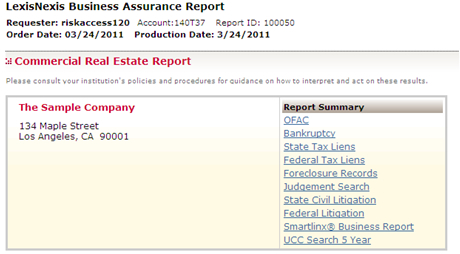
The next section contains the subject information on the left side. The right-hand side contains a list of links that you can use to quickly jump to a specific section of your report.
The following is a list of available links in alphabetical order (some of these may differ in each report):
|
Link Name |
Properties |
|
Bankruptcy |
Links to the Bankruptcy Section.
|
|
Business Credit Report |
Links to the Business Credit Report Section. |
|
Federal Felony and Misdemeanor |
Links to the Federal Felony and Misdemeanor Section.
|
|
Federal Litigation
|
Links to the Federal Litigation Section.
|
|
Federal Tax Lien |
Links to the Federal Tax Lien Section.
|
|
Fictitious Name Search |
Links to the Fictitious Name Section. |
|
Foreclosure Search |
Links to the Foreclosure Search Section.
|
|
Judgment Search |
Links to the Judgment Search Section.
|
|
Negative Publicity |
Links to the Negative Publicity Section. |
|
OFAC |
Links to the OFAC Section. |
|
SEC Violations |
Links to the SEC Violations Section.
|
|
SmartLinx Business Report |
Links to the SmartLinx Business Report Section.
|
|
SmartLinx Person Report
|
Links to the SmartLinx Person Report Section.
|
|
State Civil Litigation |
Links to the State Civil Litigation Section.
|
|
State Felony and Misdemeanor |
Links to the State Felony and Misdemeanor Section.
|
|
State Tax Lien
|
Links to the State Tax Lien Section.
|
|
Screen Element |
Properties |
|
|
Click this link to print your results. For more information, refer to Printing/Downloading in Portal Help. Please note that any sections you collapsed while viewing the report will not be included in your print.
|
|
Download |
Click this link to download HTML or text formatted files containing your search results. For more information, refer to Printing/Downloading in Portal Help. Please note that any sections you collapsed while viewing the report will not be included in your download.
|
|
Help
|
Click this link to launch online help. |